Skip to content
ScreenSteps Help
Search guides and tutorials...
Search guides and tutorials...
ScreenSteps Help
/
Authoring Content
/
Workflows
How to terminate a workflow (mark an answer or checkpoint as end of workflow)
Updated on
Feb 04, 2026
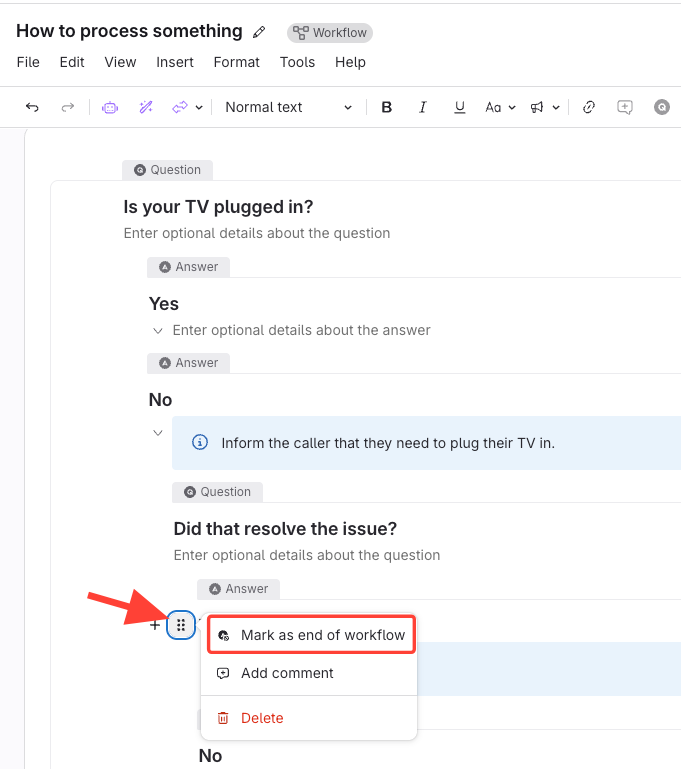
Select Mark as End of Workflow
Hover
to the left of an
answer
or
checkpoint
.
Click
the grid icon.
Select
Mark as end of workflow
.
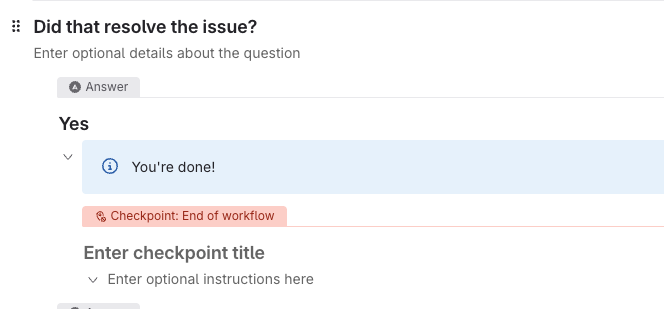
Verify "End of workflow" appears with a red flag or red text
Checklist item
Previous Article
How to Add a Checkpoint to a Workflow Article?
Next Article
Checklist item
How to Add a Question Under an Answer in a Workflow Article
Authoring Content
Find & Follow
8
What is Find & Follow?
The Purpose of an Article
What is Foundational Knowledge?
What is an Actionable Article?
What are the Different Types of Actionable Articles I Can Create?
What Type of Article Should I Create?
What Should Go Into an Article? (Scope & Detail)
Using AI in Articles
Articles
17
What is an Article?
How to Create an Article
How to Edit an Article
How to Add Content to an Article – Overview
What are Formatting Options Within an Article?
How to Save Versions of an Article
How to View Revisions of an Article (i.e. Differences Between Article Versions)
How to View Different Versions of a Saved Article from Article Preview
Overview of Editing Options in Articles
How to Add Steps in an Article
How to Add Sub-Steps to an Article
Overview of Upgrading Articles and Courses from the Legacy Format
How do I convert a legacy article to the new format?
Adding an Image to the Editor and Annotating it
How to change the background color to cells in a table
How to Restore a Previous Version of an Article
How to make a header row on a table
Workflows
14
What is a Workflow Article and What are Good Use Cases?
Demonstration of Creating a Workflow Article
How to Create a Workflow Article
How to Convert an Article to a Workflow Article
How to Convert a Workflow Article to an Article
How are Workflow Articles Different Than Articles?
How to Add a Question to a Workflow Article
What is a Checkpoint in a Workflow Article?
How to Add a Checkpoint to a Workflow Article?
How to terminate a workflow (mark an answer or checkpoint as end of workflow)
How to Add a Question Under an Answer in a Workflow Article
Video Guide of Workflow functionality
Can I Export or Print a Workflow Article?
Fix when published workflow isn't showing all content at end of editor
Publishing/Unpublishing
5
What's the Difference Between a Published Article and an Unpublished Article?
How to Publish an Article From the Content Area
How to Unpublish an Article
How to View a Preview of an Unpublished Article/Unpublished Changes to a Published Article
How to Publish an Article from the Editor
Clarify AI
14
What is Clarify AI?
Overview of Using Clarify AI to Add Content to an Article
How to Bring in Existing Content using Clarify Create (Word, Text, PDF)
How to Create an Article using Audio and Clarify Create
How to Transform Article Content to be More Actionable using Clarify Transform
How to Transform Article Content to be More Foundational using Clarify Transform
How to use Clarity Assist to Create Content from Nothing
How to use Clarity Assist to Modify Existing Content
How to use Clarity Assist to Translate Content into a Different Language
What are Custom Prompts?
Creating Custom Prompts
How to upload an audio/video file to create an article
How to Run Clarify Check
Steps to optimize imported procedures using Make Actionable AI
Importing Existing Content
5
How to Import Docx Files (i.e. Word) and Convert Them into ScreenSteps Articles
Overview of what Copy Requests Are
How to Determine Whether Copy Requests are Activated On Your Account
How to Create a Copy Request
How to Accept/Receive a Copy Request
Formatting Articles
10
How to Bold Text
How to Italicize Text
How to change Paragraph Styles (i.e. change the color of the section of text)
How to Add Highlighting to Text
How to Change the Color of Text
How to Edit Tables Properties
How to Edit a Cell in a Table
How to make alternating colors of a table
How to Manually Change Colors in a Table
Overview of the ScreenSteps Editor
Writing Articles
38
How to link to a heading within the same article
How to create a foldable section
Add columns and rows to a table
Adding file attachments to an article
Overview of default Spell check
How to add a misspelled word to the Dictionary to override Spell check
Continue numbering from a previous text field
How to Add a Checklist Item to an Article
Create an Inline Link
How to Create a Code Block
How to add Code formatting to text
Overview of Code format vs. Code block
How to convert an article to a Checklist or Workflow
Converting a Heading to a Different Content Block Type
How to Create an Article Template
How to Apply an Article Template When Creating a New Article
Create a Glossary
Merge cells in a table
Add a Hyperlink to an External Web Page
How to Update/Edit a Hyperlink
How to Enable Copy to Clipboard for a Paragraph Content Block
How to Set a Default Article Template for a Site
How to Embed a Quiz/Assessment into a ScreenSteps Article or Course
How to Hyperlink an email address in an article
Spellcheck Not Working on Web Editor
Error while saving article because link to article, chapter, or manual has been removed from site
Add additional search terms to an article using the Author Action Panel
Add additional search terms in Article Preview window
How to indent or outdent items in a list
Article Template vs PDF Template
How to Remove Formatting for Any Type of Text
How to set a default article template when creating new articles
How to to link to another article within ScreenSteps
How to link to another manual in ScreenSteps
How to link to another chapter
How to Use Find and Replace
How to Remove Copy-to-Clipboard formatting
How to Split Parts of an Article into a New Article (e.g. Refactor)
Working with Images
13
How to Configure the Keyboard Shortcut for Capturing Images in Desktop Editor
How do I select images?
How to Add Images to an Article That are Saved on Your Computer (or External Drive)
How to crop an image
How do I Resize Images in the Editor?
How to Move an Image to a Different Location in the Editor
How to Edit the ALT Text for an Image
What size screenshot should I get?
How to add a GIF to an article
Using the built-in screenshot tools in Mac or Windows to capture images
How to rotate an image
What to do if I can't Annotate an Image?
Unable to see images in editor (Troubleshooting Guide)
Working with Annotations
7
How to redact information (i.e. blur) in images
How to add annotations to your images
How to change the opacity of an annotation color
Change text color, and font size/type of a text annotation
Change the color and width of the text box annotation border
What are the Formatting Options for Arrow Annotations?
How to Add a Highlight Annotation
Video
6
How to upload video into the article
What type of video/audio file can be used and what is the maximum video length that can be uploaded?
How to change the video thumbnail
Video Upload Overview
How to record video within ScreenSteps
How to Embed/Add Video (e.g. YouTube) to an Article
Other Resources
Getting Started
Organizing ScreenSteps
Managing Articles
Working with a Team of Authors
Customize Your Site
PDFs
Admin Tasks
User and Group Permissions
Authentication (SSO, SCIM, SAML, Usernames, Passwords)
Accessibility
Integrations
Notifications
Browser Extension (Contextual Help)
FAQs
Courses
Migrating to the New Version of ScreenSteps
Print Article