Skip to content
ScreenSteps Help
Search guides and tutorials...
Search guides and tutorials...
ScreenSteps Help
/
Managing Articles
/
Article Management
How to Reference an Article (i.e. make the same article appear in multiple chapters)
Updated on
Feb 02, 2026
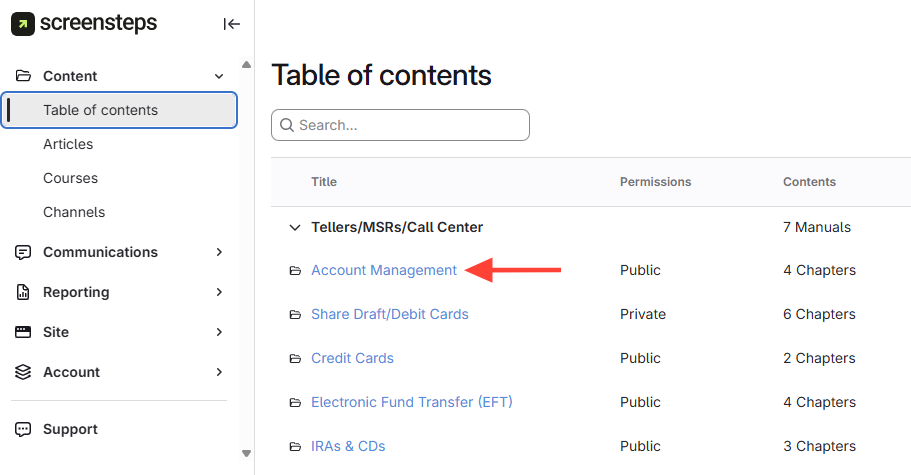
Click the Manual
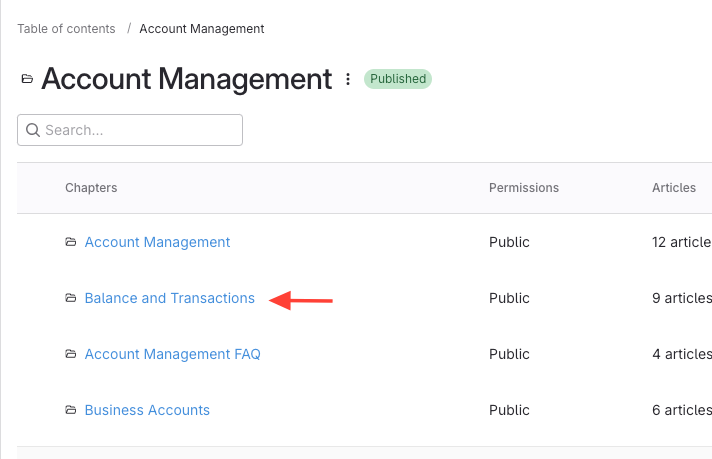
Click the Chapter you want to add the article to
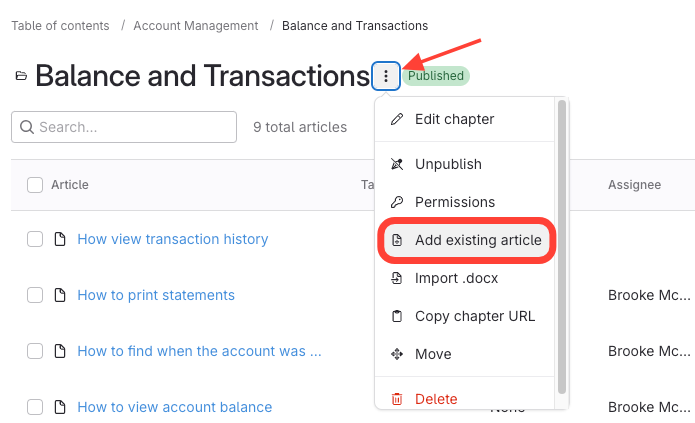
Click action menu next to chapter name > Add existing article
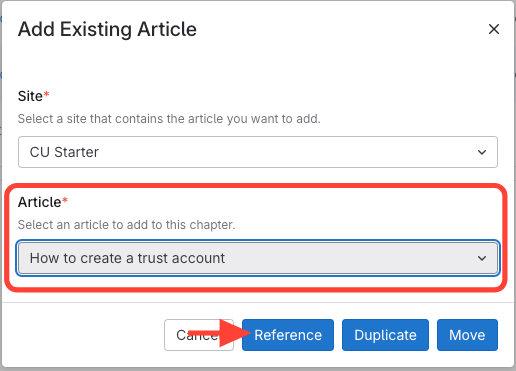
Choose the article you want > Select Reference
Checklist item
Previous Article
What are article aliases (e.g. referencing same article in multiple place)?
Next Article
Checklist item
What's the Difference Between Reference, Duplicate (i.e. Copy), and Move Article?
Managing Articles
Article Management
43
What is an Article?
How to Create an Article
How to Duplicate an Article (Make a Copy)
What's the Difference Between a Published and Draft Article?
How to Archive or Remove an Article
How to permanently delete an article
What's the Difference Between Removing and Archiving an Article?
How to Create an Uncategorized Article
How to Copy the Article's Published URL from Content Management Area
How to View the Published URLs of an Article
How to show (publish) or hide (unpublish) an article?
Recovering an article from Archived (i.e. the trash)
How do I publish a draft version of an article (i.e. update changes to a published article)?
What are article aliases (e.g. referencing same article in multiple place)?
How to Reference an Article (i.e. make the same article appear in multiple chapters)
What's the Difference Between Reference, Duplicate (i.e. Copy), and Move Article?
How to Move an Article to Another Chapter
Is an Article Published Once it is Approved?
The Purpose of an Article
How to Change the Position of an Article Within a Chapter
How to add an article to a manual from the All Articles list
How to see where an article is being used in your account
How do I find unpublished articles?
How to Search for an Article in the Content Management Area
If we're moving articles to different chapters within the same manual do we still need to add redirects?
How to Rename an Article
What are Uncategorized Articles?
How to exclude an article from search results
How to Move an Uncategorized Article to Manual
Improving article search results for specific terms
How to create a new article using the Author Action Panel
Bookmark Your ScreenSteps Admin Area
Overview of Creating a Style Guide
How to Add/Remove Article Bookmarks
Example of a Style Guide for "How do I..." questions
Example of a Style Guide for Checklist Procedures
Example of a Style Guide for Workflow articles
ScreenSteps Maintenance Guide
What is the Author Action Panel and How is it Used?
Assigning Articles or Changing Status using the Author Action Panel
How many articles does my site have?
How to open the editor from the published article (Author Action Panel)
How to move an article to a different site.
Article Revisions
4
Overview of Revisions and Revision History of Articles
How to Save Versions of an Article
How to View Revisions of an Article (i.e. Differences Between Article Versions)
How to View Different Versions of a Saved Article from Article Preview
Articles View
2
What is the Articles View?
How to Apply Filters to View Specific Articles in All Articles
Certifying Content
10
What is Article Certification?
How to Track Certification for an Article
How to Manage the Content Certification Process via Reports
How to Certify or Recertify the Contents of an Article
How to Assign a Process Owner OR Not Require a Process Owners for Article Certification
How to Set a Default Certification Cadence
How to set the certification expiration of an article to a specific date
How to Update Default Settings for Certification: Renewal Cadance or Requiring a Process Owner
How to Assign a Process Owner for Certifying Articles
What is Content Certification and How is it Used?
Tags
7
What are Tags and How Should I Use Them?
How to Create a New Tag in the Tag Library
How to Delete Tags From Your Tag Library
How to Edit a Tag's Name in the Tag Library
How to Manage Your List of Tags
How to add or remove tags from an article
How to filter articles by tag
Bulk Actions
13
What is Bulk Actions and What can it do?
How to Bulk Copy Multiple Articles at Once (i.e. Bulk Actions)
How to Move Multiple Articles to a Different Chapter at Once (i.e. Bulk Actions)
How to Assign Multiple Articles to an Editor at Once (i.e. Bulk Actions)
How to Change Who is Required to Certify to Multiple Articles at Once (i.e. Bulk Actions)
How to Change the Certification Requirement for Multiple Articles at Once (i.e. Bulk Actions)
How to Change the Article Status for Multiple Articles at Once (i.e. Bulk Actions)
How to Add or Remove Tags to Multiple Articles at Once (i.e. Bulk Actions)
How to Change Access Control (i.e. Restricted or Unrestricted) to Multiple Articles at Once (Bulk Actions)
How to Change the Comment Permissions for Multiple Articles at Once (i.e. Bulk Actions)
How to Change the Search Visibility to Multiple Articles at Once (i.e. Bulk Actions)
How to Change the Published Status (Publish/Unpublish) of Multiple Articles at Once (i.e. Bulk Actions)
How to Archive/Delete Multiple Articles at Once?
Options for Users Viewing a Published Site
3
How to be Notified When End Users (Viewers) Leave Comments/Feedback
How to see comments users leave on Published articles (viewer feedback)
Confirm email notifications for article assignment are enabled
Article Requests
8
How to Enable Article Requests for a Site
What is the Purpose of the Article Request button and Where is it Located?
How to Create an Article from an Article Request
How to Style the Article Requests Button
How End Users Submit an Article Request
How to Navigate to Article Requests in your Content Management site
How do I prioritize Article Requests
How to Filter Article Requests by Priority
Other Resources
Getting Started
Organizing ScreenSteps
Authoring Content
Working with a Team of Authors
Customize Your Site
PDFs
Admin Tasks
User and Group Permissions
Authentication (SSO, SCIM, SAML, Usernames, Passwords)
Accessibility
Integrations
Notifications
Browser Extension (Contextual Help)
FAQs
Courses
Migrating to the New Version of ScreenSteps
Print Article