Click to View Example
How to increase debit card limits
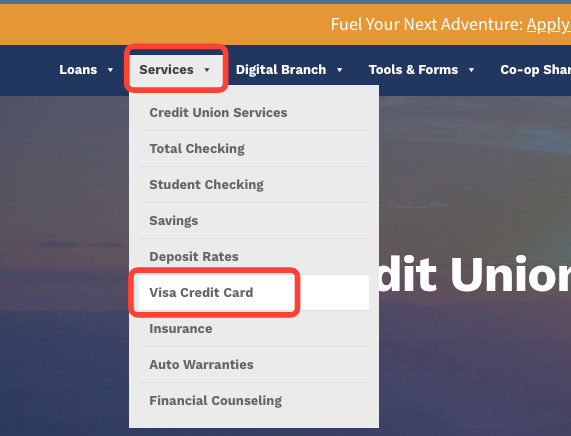
- Click Visa Credit Card
- Open Card program
- Navigate to Services > Visa Credit Card
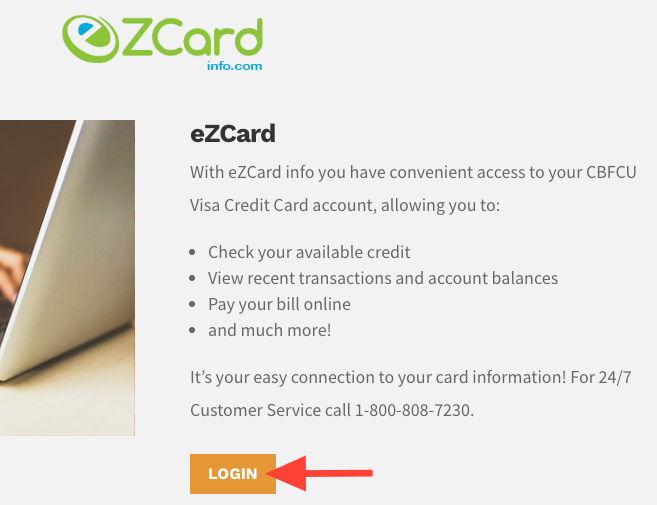
- Click Login
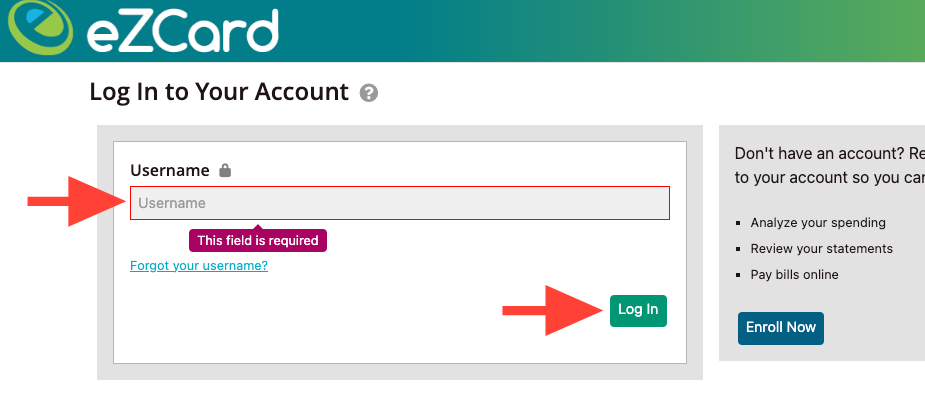
- Login with username
- Enter Username
- Click Log In
Title
Start the title with "How to"
Only the first letter in the title is capitalized, except for proper nouns.
Make the title very specific to the action and where the action is taking place.
Example: How to add new editors in ScreenSteps
Introduction
Writing an introduction is optional
use the Introduction style
Headings
Capitalization
First letter of a sentence
Proper nouns
Elements on a screen (buttons, tabs, etc.)
Wording and formatting
Start the heading with an action verb such as "Click" or "Navigate" or "Scroll."
Each heading is short.
Do not include the preposition "on" (example: Click on the button––instead, Click the button).
Use > when describing a series of clicks. Example: Click Home > Profile > Action.
Example of a heading: Click Account Settings
Steps
Use Steps to provide clear sequencing to step-by-step procedures.
- Search for Account number
- Open Account settings
Paragraph text
Capitalization
First letter of a sentence
Proper nouns
Elements on a screen (buttons, tabs, etc.)
Wording and formatting
Bold words that describe areas of screen that are clicked. Example: Click Account Settings to see a list of options.
Use numbered lists when describing a series of steps that must be done in order.
Use bulleted lists for descriptions with no particular order.
Match numbered list to sequencing annotations on screenshots
Use > when describing a series of short clicks. Example: Click Home > Profile > Action.
Tables
Use tables to describe what should be typed in fields fields on a form.
Use Header Row/Column
Example:
| Address | Phone Number | |
|---|---|---|
| Manager | ||
| Supervisor |
Hyperlinks
Use inline links for hyperlinks to other knowledge base articles that provide explanations which enhance the content within the article.
Use new tabs for hyperlinks to other knowledge base articles that direct a reader to more relevant content.
Foldable sections
Additional information that is helpful, but not pertinent, can be included as a foldable section.
Paragraph styles
Screenshots
Screenshots should be no wider than 800 pixels
Use a screenshot for each major on-screen action.
Use multiple screenshots in the same block to demonstrate a sequence.
If multiple screenshots are used, include a drop shadow for each screenshot.
Annotations
Use annotation presets.
Do not use more than 4 sequence annotations on a single screenshot.
Use Arrows to point out parts of the screen that need to be clicked or fields that need to be entered.