Skip to content
ScreenSteps Help
Search guides and tutorials...
Search guides and tutorials...
ScreenSteps Help
/
Organizing ScreenSteps
/
Categories
How to Delete a Category
Updated on
May 21, 2026
Heading anchor
Identify the Category to be removed
Heading anchor
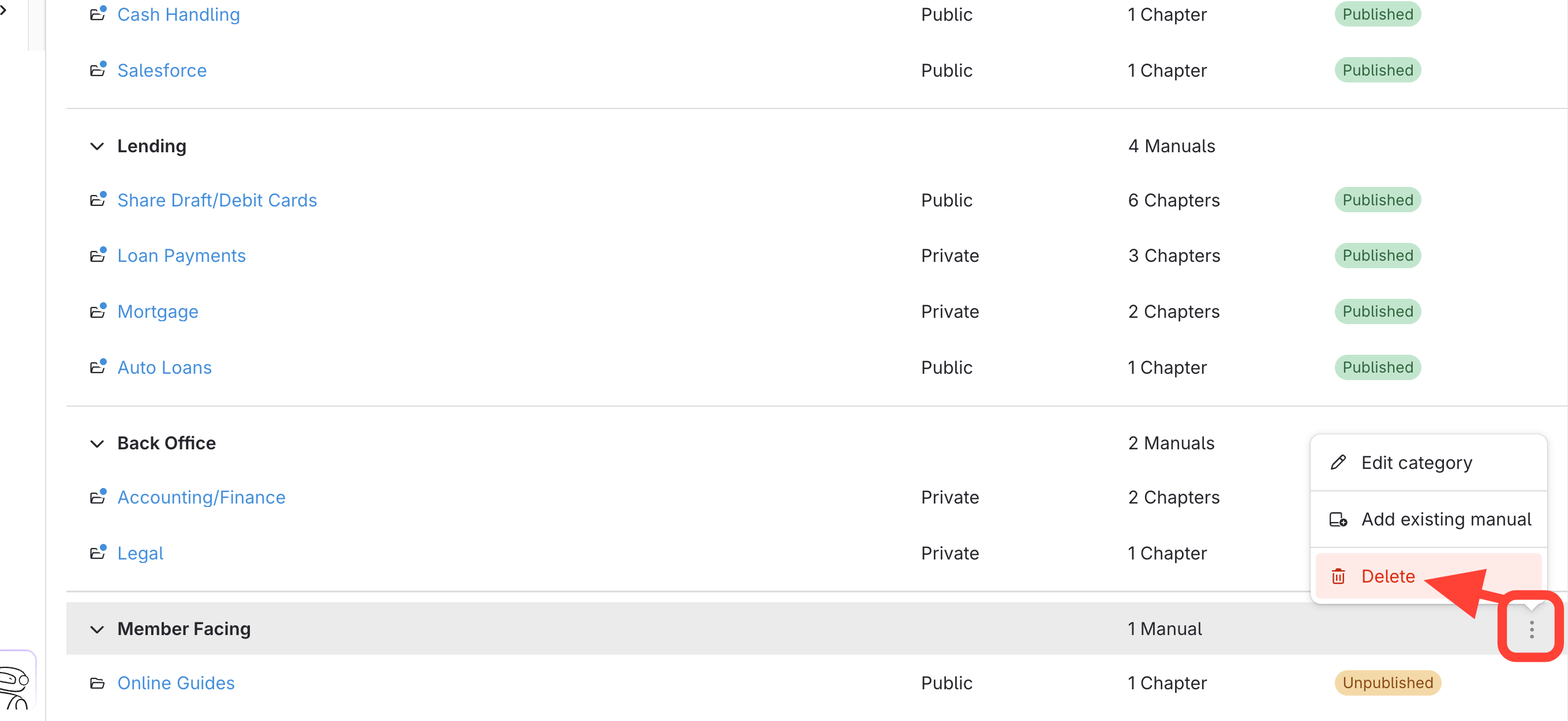
Select Delete from the menu
Click
the
Action menu
(three dots)
Click Delete
Heading anchor
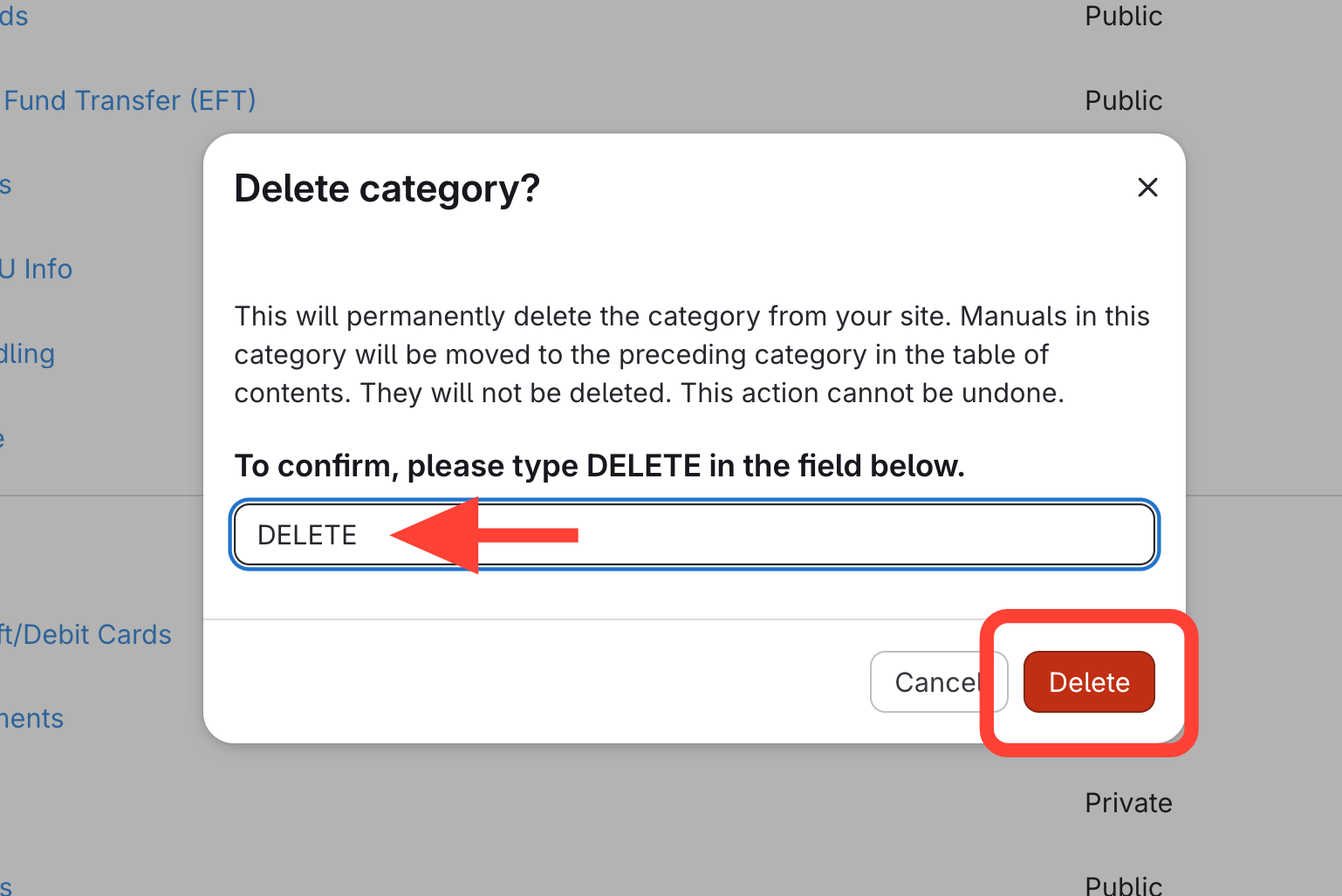
Confirm Deletion
Type DELETE
in the confirmation field
Click
the
Delete
button to confirm
Checklist item
Previous Article
How to Add a Category Description
Next Article
Checklist item
What is a Manual?
Organizing ScreenSteps
Accounts
5
What is a ScreenSteps Account?
How to create a ScreenSteps Account
How to change the name of your ScreenSteps account
How to find your ScreenSteps Account
How to delete a ScreenSteps account
Sites
16
What is a Site?
How to Create a Site
How to Rename a Site
How to Toggle Between Sites
Who can see a site?
How to View a Published Site
How do I make a site private?
How to Navigate to Site Settings
How to access a site
How to Make a Site Hidden from Search Engines
How to Export an Article Report (CSV of site article titles/status/owners)
How to Delete a Site
Two ways to access Site Settings
How to Navigate to the Table of Contents
How to Make a Site Public/Private
How to go from your published knowledge base to the Admin area
Categories
6
What is a Category?
How to create a category
How to Rename a Category
How to Reorganize/Reorder Manuals Into Different Categories
How to Add a Category Description
How to Delete a Category
Manuals
16
What is a Manual?
How to Create a Manual
How to Rename a Manual
How to Add Existing Manuals (i.e. share) to a Site
How to Edit the Properties for a Manual
How to Publish/Unpublish a Manual
How do you refresh a manual to see the latest changes?
How to Find a Manual that was Removed from a Site
How to Duplicate a Manual and Add it to Another Site
How to Re-Order Manuals
Overview of Sharing a Manual Between Sites
How to Remove or Delete a Manual
How to Move a Chapter to Another Manual
How to create a new manual using the Author Action Panel
How to Prepare a CSV for Importing Content Structure
How to Stop sharing Manuals between Sites
Chapters
8
What are chapters?
How to Create a New Chapter
How to Rename a Chapter
How to Publish/Unpublish a Chapter
How to Provide a Link to a Chapter in a Manual
How to Move a Chapter to Another Manual
How to Create a new Chapter using the Author Action Panel
How to Copy a Chapter to Another Manual
Other Resources
Getting Started
Managing Articles
Authoring Content
Working with a Team of Authors
Customize Your Site
PDFs
Admin Tasks
User and Group Permissions
Authentication (SSO, SCIM, SAML, Usernames, Passwords)
Accessibility
Integrations
Notifications
Browser Extension (Contextual Help)
FAQs
Courses
Migrating to the New Version of ScreenSteps
Print Article