Skip to content
ScreenSteps 5
Search guides and tutorials...
ScreenSteps 5
/
Organizing Categories, Manuals and Chapters
/
Categories
How to Rename a Category
Updated on
Oct 02, 2025
You will
rename
a category.
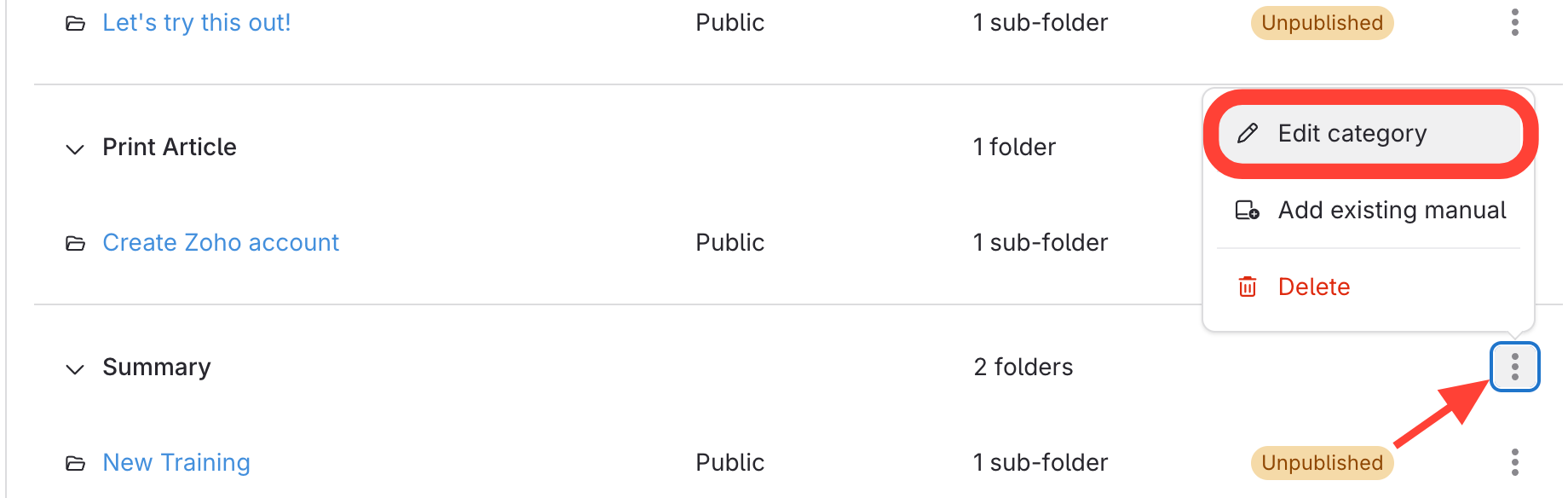
Open Category Details
Click
the three dots next to the category title.
Select
Edit Category
.
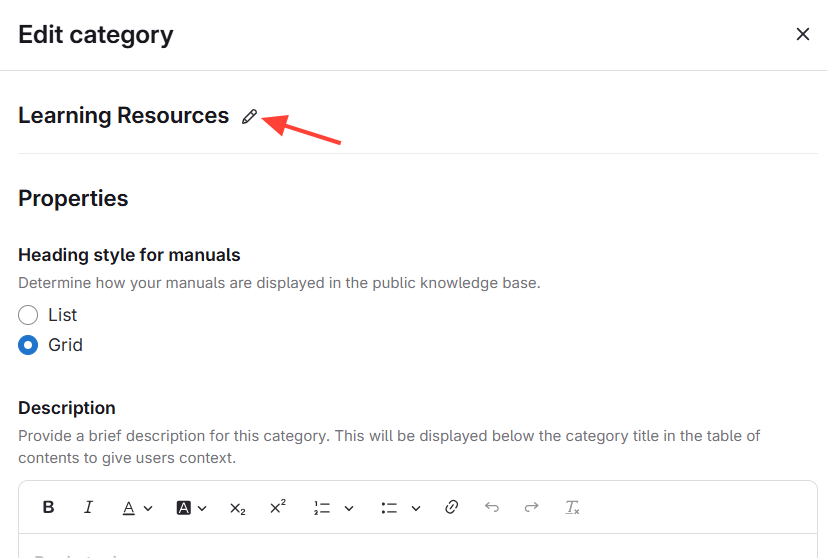
Change Category Title
Update
the Title.
Press
Enter/Return to save.
Checklist item
Previous Article
How to create a category
Next Article
Checklist item
How to Organize Manuals into Categories
Organizing Categories, Manuals and Chapters
Categories
5
What is a Category?
How to create a category
How to Rename a Category
How to Organize Manuals into Categories
How to Add a Category Description
Manuals
13
What is a Manual?
How to Create a Manual
How to Rename a Manual
How to Add Existing Manuals (i.e. share) to a Site
How to Edit the Properties for a Manual
How to Publish/Unpublish a Manual
How do you refresh a manual to see the latest changes?
How to Duplicate a Manual and Add it to Another Site
How to Re-Order Manuals
How to Share a Manual Between Sites
How to Remove or Delete a Manual
How to Move a Chapter to Another Manual
How to create a new manual using the Author Action Panel
Chapters
8
What are chapters?
How to Create a New Chapter
How to Rename a Chapter
How to Publish/Unpublish a Chapter
How to Provide a Link to a Chapter in a Manual
How to Move a Chapter to Another Manual
How to Create a new Chapter using the Author Action Panel
How to Copy a Chapter to Another Manual
Other Resources
Getting Started
Your ScreenSteps Account and Sites
Managing Articles
Authoring Content
Working with a Team of Authors
Customize Your Site
PDFs
Admin Tasks
User and Group Permissions
Authentication (Usernames, Passwords, SSO)
Accessibility
Integrations
Notifications
Contextual Help
FAQs
Courses
Print Article