Skip to content
ScreenSteps Help
Search guides and tutorials...
ScreenSteps Help
/
Admin Tasks
/
Search Contexts
How to Create a Search Context for a Group
Updated on
Aug 06, 2026
Heading anchor
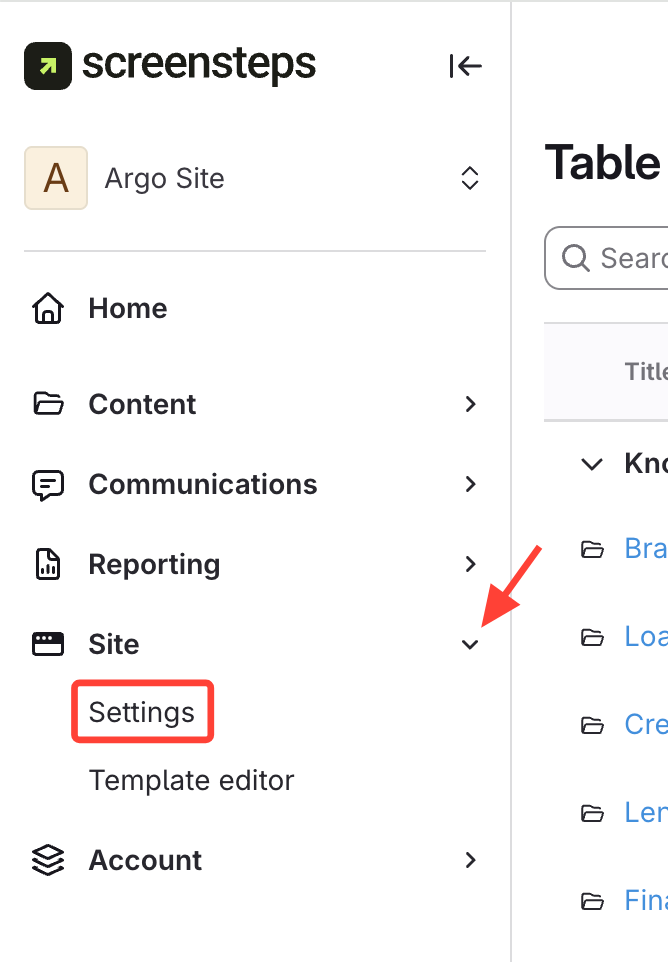
Navigate to Account Settings
Click Account
Select Settings
Heading anchor
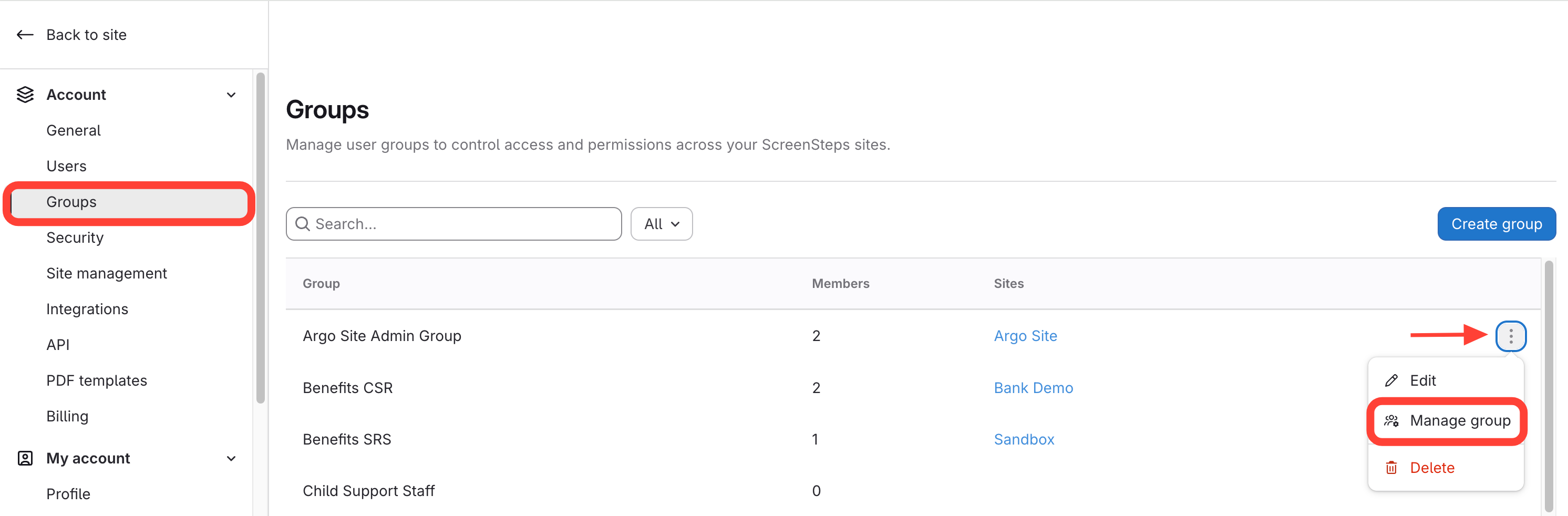
Edit the Group you Want to Add Context to
Select Groups
Click the three dots next to the group
Select Manage Group
Heading anchor
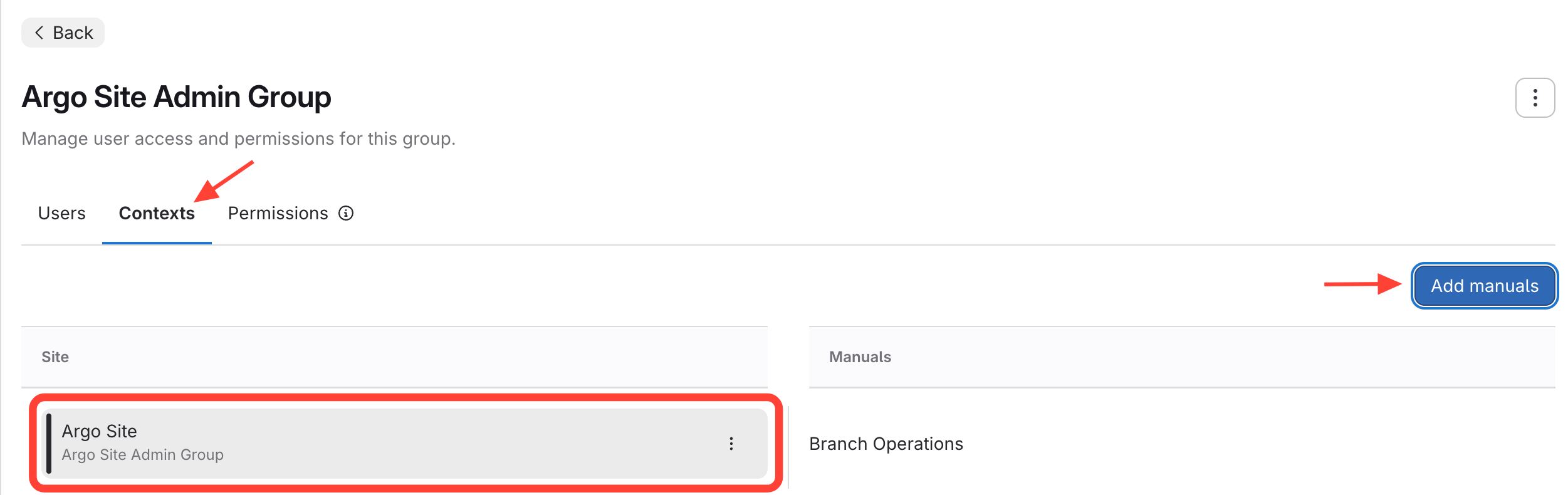
Add Manuals to your Context
Select Contexts
Click the site you want the context to be added to
Select Add Manuals
Heading anchor
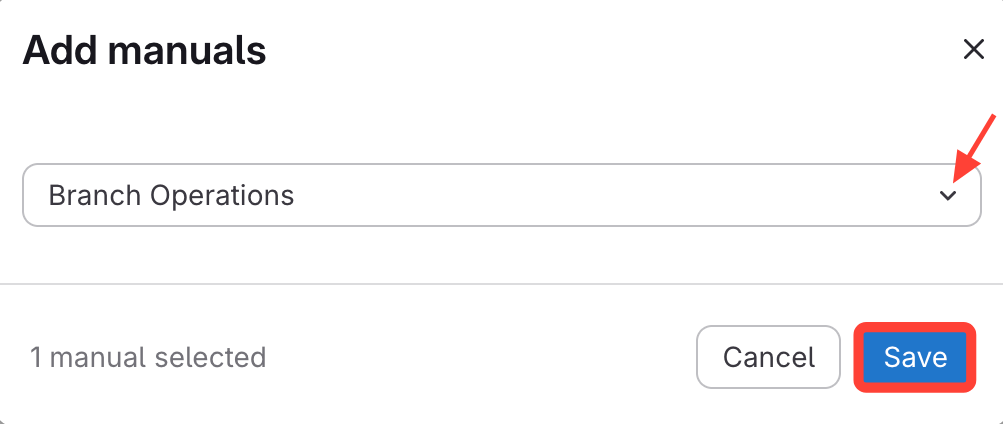
Add the Manual
Select the manual
Click Save
Checklist item
Previous Article
Overview of Search Contexts
Next Article
Checklist item
How to Remove a Search Context for a Group
Admin Tasks
Managing Sites
13
How do I use slugs?
Finding Your site ID or slug (permalink)
How to get the public url for a site
Creating Redirects
How to Clone a Site
How to add additional sites to your plan
How to find the subdomain for your site
How to Determine if a Manual Uses a Slug
How to Locate the Article ID
How to Locate the Chapter ID
How to Locate the Manual ID
How to Delete a Redirect
What is a Redirect and How are They Used?
Users (Site User / Account Admin)
7
How to Receive Daily Activity Updates
How to Edit Your Password
How to Check who the Account Admins and Site Users are in your ScreenSteps Account
How to Prompt a User to Reset Their Password
How a user can change their profile details
How to Edit a User's Profile
How to change my profile settings
Reports
14
How do I add tracking code to my site?
How to track searches in Google Analytics
How to use a javascript object to track individuals if you are using an analytics service
How to Navigate to Reports in ScreenSteps
How to view what users are searching for
How to Find Which Articles Users are Viewing in Reports
How to Find Individual User Activity in Reports
How to Find Browser Extension Views in Reports
How to View Checklist Articles in Reports
How Find Article Views for a Specific Manual in Reports
How to Find Article Views from within the Article Preview
Generating a Site Link Checker Report
What does the Hit Column mean in my Search Report?
Check Which Articles a User Has Visited
Account Settings
2
How do I change my company name?
How do I change my account URL?
User Groups
3
What is a user group?
How to change the Site Permissions assigned to a user group
How do I remove users from a group?
Plans and Billing
9
How do I view/change my billing information?
How do I cancel my account?
How do I change my account plan?
How do I have my account invoices sent to a new email address?
How do I view past invoices?
How do I Change Billing to Yearly?
How do I change who receives the invoices?
How to view details of my subscription plan
Can I have more than one email address receive invoices?
Additional Topics
5
How to Change the Identity Provider for the Admin/Content Management Area (e.g. SAML)
How to Change the Identity Provider for the Primary Site (e.g. SAML)
How to Change the Identity Provider for Your Other Sites (e.g. SSO)
How to see the updates ScreenSteps makes
Overview of Home Screen, Events, and Content Health
Search Contexts
6
Overview of Search Contexts
How to Create a Search Context for a Group
How to Remove a Search Context for a Group
How to View the Manuals Assigned to a Group's Search Context
How to know if your account is set up for Search Context
How to change search context in published site
Other Resources
Getting Started
Organizing ScreenSteps
Managing Articles
Authoring Content
Working with a Team of Authors
Customize Your Site
PDFs
User and Group Permissions
Authentication (SSO, SCIM, SAML, Usernames, Passwords)
Accessibility
Integrations
Notifications
Browser Extension (Contextual Help)
FAQs
Courses
Migrating to the New Version of ScreenSteps
Print Article