Overview of Migrating Existing Content into ScreenSteps
Migrating existing documentation, such as user guides or manuals, into ScreenSteps involves restructuring and optimizing content to create a more accessible and effective knowledge hub. The goal is to make information easy to find, follow, and use, rather than simply importing large documents verbatim.
- ScreenSteps transforms traditional documentation into organized, searchable knowledge bases.
- Content is split into manageable sections and articles for better usability.
- Optimization may involve rewriting or importing content as-is, depending on the type and purpose.
Background: Why Not Import Large Documents Directly?
Importing entire documents, such as lengthy PDF user guides, as single articles is discouraged. Large, unstructured articles make it difficult for users to find relevant information quickly and can hinder performance and usability.
- Breaking content into smaller articles improves searchability and user experience.
- Users are more likely to find and follow guides when content is organized logically.
- ScreenSteps supports exporting structured content back into formats like PDF with organized tables of contents.
Approaches to Content Migration
There are two primary approaches to migrating content into ScreenSteps:
1. AI-Optimized Content
Actionable guides and procedures are often rewritten using AI to make them easier to follow. This involves:
- Identifying key topics and splitting them into individual articles.
- Using AI to clarify steps, reduce unnecessary wording, and improve readability.
- Ensuring that each article addresses a specific user need or question.
- AI optimization enhances clarity and usability for procedural content.
- Articles become more actionable and user-friendly.
2. Verbatim Import
Some documents, such as policies or formal procedures that require precise wording, are imported without modification. This is suitable for:
- Content that has been carefully reviewed and approved.
- Documents that must remain unchanged for compliance or auditing purposes.
- Tables, diagrams, or other structured information that does not benefit from AI rewriting.
- Verbatim import preserves the original intent and formatting.
- Best for formal or regulated documentation.
Organizing Content for Migration
Effective migration starts with organizing your existing documentation into a clear folder structure. This typically includes:
- Top-level folders for each manual.
- Subfolders for sections or chapters within each manual.
- Individual files or documents for each article or topic.
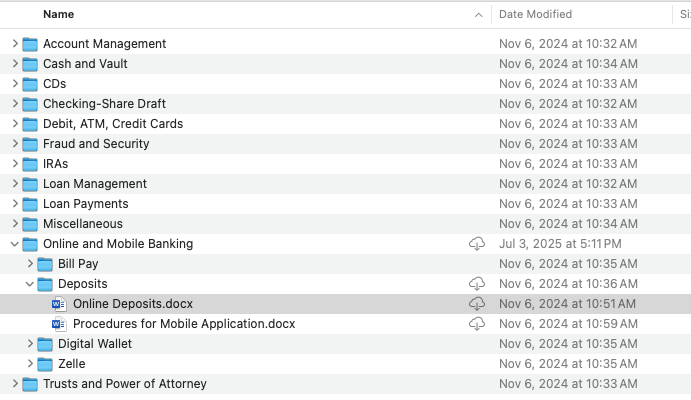
This organization helps the migration team identify where to split documents, create article titles, and determine which content should be optimized or imported verbatim.
- A clear folder structure streamlines the migration process.
- Helps identify actionable articles and foundational content.
- Facilitates collaboration between your team and the migration team.
Why This Matters
Properly migrating and structuring content in ScreenSteps ensures that users can quickly find and follow the information they need. This approach supports better performance, easier maintenance, and a more effective knowledge base.
- Structured content improves searchability and user satisfaction.
- Optimized articles are easier to update and maintain.
- Supports compliance and quality assurance for formal documentation.
Key Concepts and Terms
Understanding the following terms is essential when preparing content for migration into ScreenSteps:
- Manual: A collection of related documentation, often corresponding to a product or process (e.g., "Xerox Manual").
- Section/Chapter: Subdivisions within a manual that group related topics (e.g., "Product Overview," "Copy," "Fax").
- Article: Individual, focused pieces of content that address specific tasks or concepts (e.g., "How to Scan a Document").
- Verbatim Import: Bringing content into ScreenSteps exactly as it appears in the original document, without modification.
- AI Optimization: Using artificial intelligence to rewrite or restructure content, making it clearer and easier to follow.
- Manuals, sections, and articles form the core structure in ScreenSteps.
- Content can be imported verbatim or optimized using AI.
- Choosing the right approach depends on the content's purpose and audience.