Skip to content
ScreenSteps Help
Search guides and tutorials...
ScreenSteps Help
/
Authentication (SSO, SCIM, SAML, Usernames, Passwords)
/
Using ScreenSteps Remote Authentication with Atlassian Crowd
Configuring the PHP Script
Updated on
Nov 25, 2025
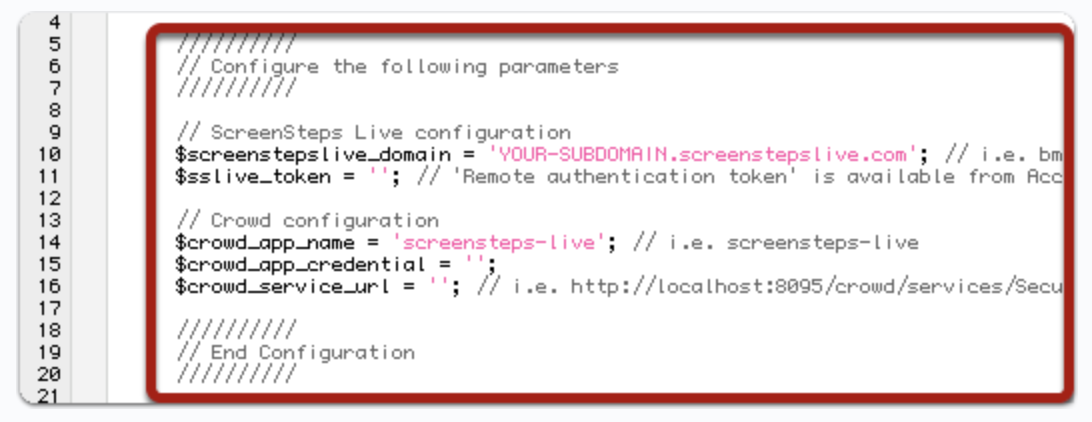
Open the crowd_remote_auth.php file.
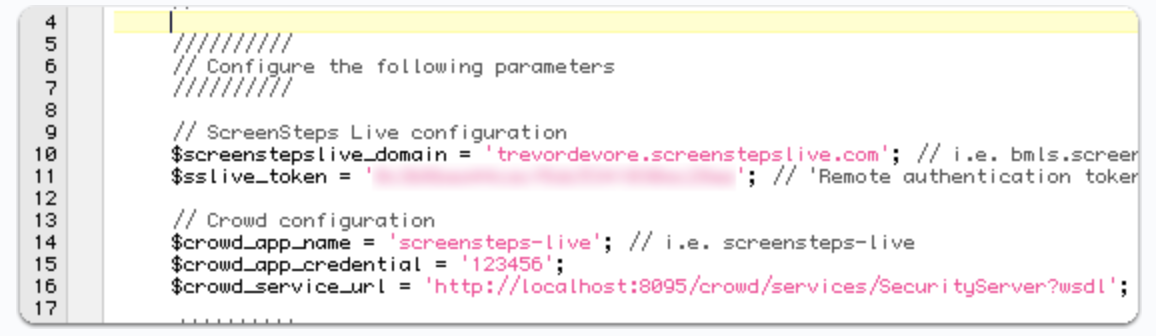
Enter values for these variables at the top of the file:
$sslive_token
: Use the
Remote authentication token
from the previous step.
$crowd_app_credential
: Enter the password set when adding the application to Crowd.
$crowd_service_url
: Enter the SOAP API path (update the domain as needed, e.g.,
localhost:8095
).
Checklist item
Previous Article
What to do if you request an email with a link to log you in but it's not working
Next Article
Checklist item
Uploading the PHP scripts
Authentication (SSO, SCIM, SAML, Usernames, Passwords)
Passwords
1
How to reset a password
Single Sign-on
10
What is Single Sign-on?
Setting Up Your Application to Use ScreenSteps Remote Authentication (Not SAML)
Deciding on your Single Sign-on Strategy
How Identity Providers, domains, sites, and your account are associated
How to Set up Single Sign-on with Microsoft (Azure/Entra ID) for your Account and Primary Site
How to Manage User Groups Through your Identity Provider using the SAML Assertion
How to update your certificate from Azure/Entra and add it to ScreenSteps
How to Set up Single Sign-on with Google Workspace
Adding a user to a group in Entra ID
Setting up Your Identity Provider (IDP) to Sync User Groups
Single Sign-on FAQs
4
I use Single Sign-on (SSO) and I locked myself out – how do I get back into my account?
How to Bypass Single Sign-on (SSO) so Users Can Log in Without SSO
How to request an email with a link that will log you in one time
What to do if you request an email with a link to log you in but it's not working
Using ScreenSteps Remote Authentication with Atlassian Crowd
2
Configuring the PHP Script
Uploading the PHP scripts
Other Resources
Getting Started
Organizing ScreenSteps
Managing Articles
Authoring Content
Working with a Team of Authors
Customize Your Site
PDFs
Admin Tasks
User and Group Permissions
Accessibility
Migrating from Legacy to New ScreenSteps
Integrations
Notifications
Browser Extension (Contextual Help)
FAQs
Courses
Print Article