Should I use this or SAML?
If your application already has support for acting as a SAML Identity Provider, then please use our SAML integration.
How it works
When a user requests a ScreenSteps page and they are not logged into ScreenSteps they will be redirected to a page set up on your website or web application.
Your website will handle logging the user into that page.
Your website will redirect the user back to a ScreenSteps page with some query parameters and an MD5 hash.
ScreenSteps will validate the MD5 hash and log the user in.
Requirements:
Information provided by ScreenSteps to your server
When the ScreenSteps server redirects a user to your remote authentication url it sends along a couple of pieces of information in the query parameters:
return_to_url: This is the url that the user requested on ScreenSteps. You will pass this back to ScreenSteps after the user authenticates so that ScreenSteps can display the requested resource to the user.timestamp: This is the time value that you can use when generating the MD5 hash.
The MD5 hash that your server generates
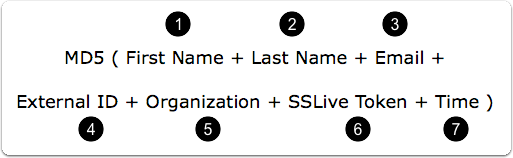
In order to information ScreenSteps that a user has permission to view content you must pass over an MD5 hash. The MD5 hash is comprised of of the following strings:
First name of the user (required)
Last name of the user (optional)
Email of the user (required)
External id (used to uniquely identify user, can be empty in which case email is used, optional)
Organization (optional)
ScreenSteps remote authentication token (required)
Time (unix time, required). Use the
timestampvalue passed over from ScreenSteps.
The ScreenSteps URL that your server sends a response to
To notify ScreenSteps that a user has successfully logged in you redirect to a url and pass a number of parameters. The URL you redirect to will be the Remote Consumer URL that you can find in your remote authentication settings. An example might look like this:
https://example.screenstepslive.com/login/remote/44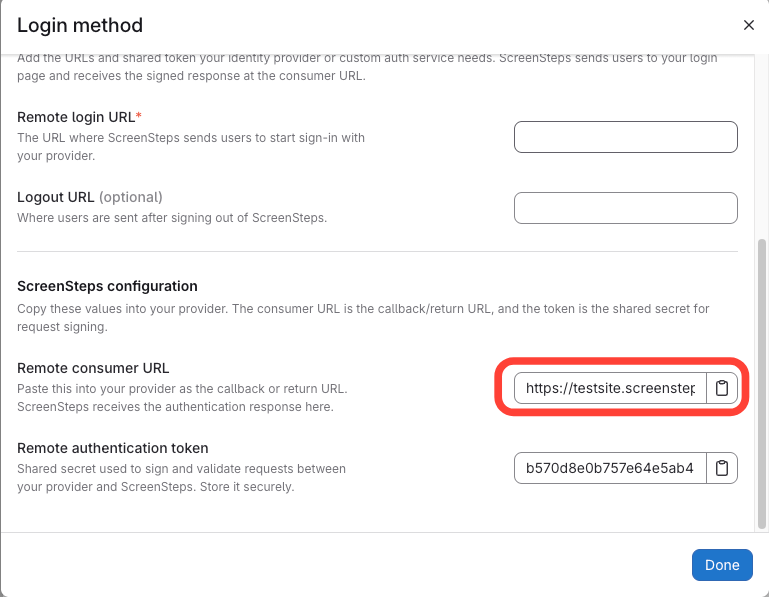
You can pass the rest of the information needed as GET parameters in the query string. You will pass the following information as GET parameters:
first_namelast_nameemailexternal_idorganizationtimestamphashreturn_to_url
Here is an example:
https://example.screenstepslive.com/login/remote/44?first_name=FIRST_NAME&last_name=LAST_NAME&email=you%40domain.com&
external_id=EXTERNAL_ID&organization=ORGANIZATION×tamp=TIMESTAMP&
hash=MD5_HASH&return_to_url=RETURN_TO_URLBy passing over the information used to create the hash ScreenSteps can combine the secret remote authentication token with the information you passed over in order to confirm that the hash is valid. This keeps others from being able to log users in.
Click here to see a PHP Example
Here is some example PHP code which takes the timestamp and return_to_url GET parameters, combines them with user information, and then redirects back to the ScreenSteps server.
$sToken = '{{ScreenSteps Remote Authentication Token}}';
$sRemoteAuthenticationURL = '{{ScreenSteps Remote Consumer URL}}';
$sFirstName= 'John';
$sLastName= 'Doe';
$sEmail = '[email protected]';
$sExternalID = "";
$sOrganization = "";
$sReturnToURL = urlencode($_GET['return_to_url']);
$sTimestamp = $_GET['timestamp'];
/* Build the message */
$sMessage = $sFirstName.$sLastName.$sEmail.$sExternalID.$sOrganization.$sToken.$sTimestamp;
$sHash = MD5($sMessage);
$sso_url = $sRemoteAuthenticationURL .'?'.
'first_name='.urlencode($sFirstName).'&last_name='.urlencode($sLastName).
'&email='.urlencode($sEmail).'&external_id='.$sExternalID.'&organization='.$sOrganization.
'×tamp='.$sTimestamp.'&hash='.$sHash.'&return_to_url='.$sReturnToURL;
header("Location: ".$sso_url);
exit();