Skip to content
ScreenSteps Help
Search guides and tutorials...
Search guides and tutorials...
ScreenSteps Help
/
Working with a Team of Authors
/
Comments and Track Changes
How to View All Collaborator Comments
Updated on
Feb 03, 2026
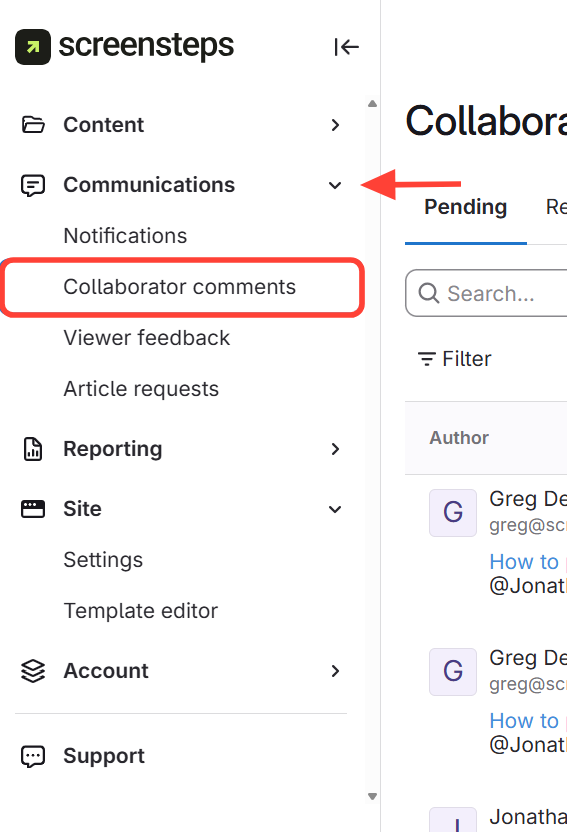
Navigate to Collaborator Comments
Click the
Communications
dropdown(on the left-hand side of the screen).
Select Collaborator Comments
.
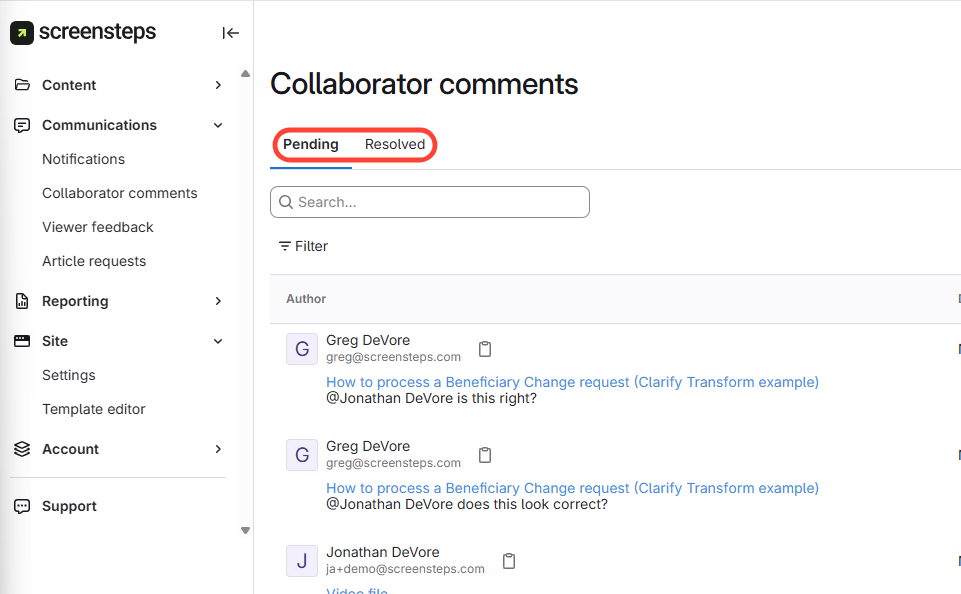
View Pending and Resolved Comments
Checklist item
Previous Article
How to View Collaborator Comments within an Article
Next Article
Checklist item
How to Reply to a Suggested Change (i.e. Track Changes)
Working with a Team of Authors
Overview of Collaborating with Others
4
Can Other Collaborators Work on an Article at the Same Time?
How Can I Use Assignments and Statuses to Manage Content Creation?
How to View Different Versions of a Saved Article from Article Preview
How to View Revisions of an Article (i.e. Differences Between Article Versions)
Comments and Track Changes
12
How to Assign and Set the Status of an Article
How to Provide Feedback to Editors (Using Comments)
What Permissions Are Needed for a Site User to Edit Articles?
How are Users Notified That They've Been Assigned an Article?
How to View Collaborator Comments within an Article
How to View All Collaborator Comments
How to Reply to a Suggested Change (i.e. Track Changes)
How to Reply to a Collaborator Comment
How to View a History of Resolved Comments
Can I View All of the Accepted and Rejected Suggestions to an Article?
How to Turn on Track Changes (Suggested Changes)
How to View Resolved Comments On an Article
Article Activity
3
What Does Article Activity Show?
How to View Article Activity
How to View an Editor's Activity
Other Resources
Getting Started
Organizing ScreenSteps
Managing Articles
Authoring Content
Customize Your Site
PDFs
Admin Tasks
User and Group Permissions
Authentication (SSO, SCIM, SAML, Usernames, Passwords)
Accessibility
Integrations
Notifications
Browser Extension (Contextual Help)
FAQs
Courses
Migrating to the New Version of ScreenSteps
Print Article