Skip to content
ScreenSteps Help
Search guides and tutorials...
ScreenSteps Help
/
Browser Extension (Contextual Help)
/
Setting up Contextual Help
How to view what site you're logged into on Sidekick
Updated on
Feb 19, 2026
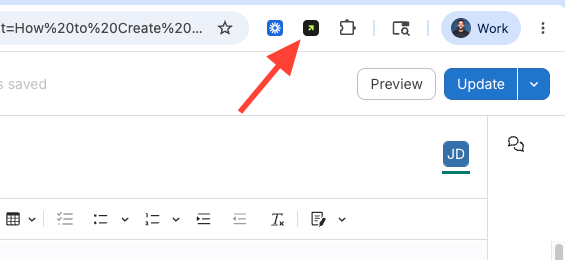
Open the Browser Extension
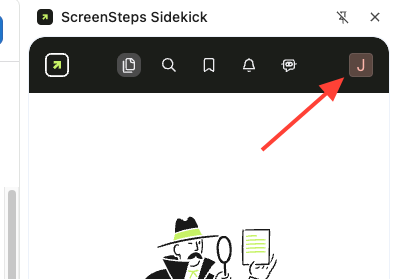
Open Settings
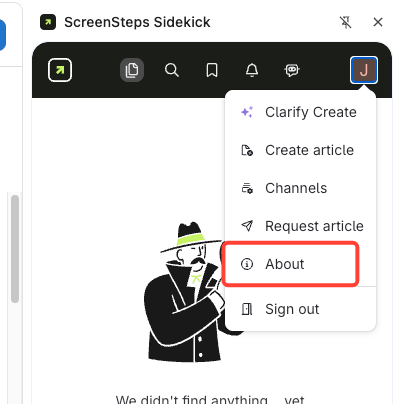
Click
Initial >
Settings
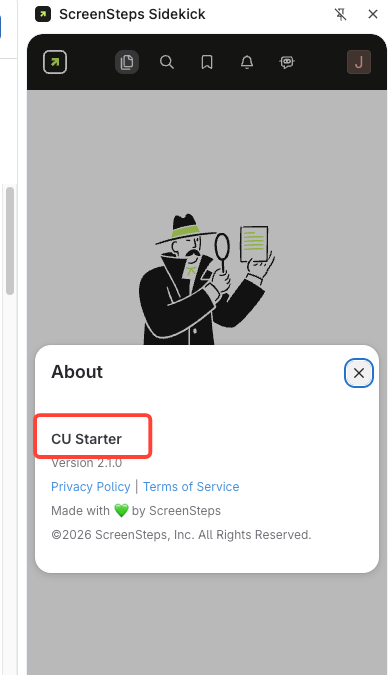
Identify Site Name under Settings
Checklist item
Previous Article
ScreenSteps Sidekick – Enterprise (MDM) Deployment Guide
Next Article
Checklist item
What are the requirements to access Sidekick and Clarify Create?
Browser Extension (Contextual Help)
Setting up Contextual Help
8
Overview of the ScreenSteps Browser Extension for Contextual Help (Sidekick)
How to Install the ScreenSteps Browser Extension
How to Uninstall the ScreenSteps Browser Extension in Chrome
How to Uninstall the Browser Extension in Edge
How to switch between sites in the browser extension
ScreenSteps Sidekick – Enterprise (MDM) Deployment Guide
How to view what site you're logged into on Sidekick
What are the requirements to access Sidekick and Clarify Create?
Using Contextual Help
3
How to Create Contextual Help Channels
How to Add Content to Existing Contextual Help Channels
How to Refresh the Browser Extension
Beta Features
1
How to Create New Content from the Beta Extension
Other Resources
Getting Started
Organizing ScreenSteps
Managing Articles
Authoring Content
Working with a Team of Authors
Customize Your Site
PDFs
Admin Tasks
User and Group Permissions
Authentication (SSO, SCIM, SAML, Usernames, Passwords)
Accessibility
Migrating from Legacy to New ScreenSteps
Integrations
Notifications
FAQs
Courses
Print Article