Overview of Accessibility Updates in ScreenSteps (April 2018)
ScreenSteps has implemented several updates to help its Knowledge Bases better meet accessibility standards. These improvements are particularly important for organizations, such as higher educational institutions, that require compliance with accessibility guidelines.
- Accessibility standards ensure that digital content is usable by people with disabilities.
- Recent updates focus on screen reader compatibility, keyboard navigation, and color contrast.
Key Terms
| Term | Definition |
|---|---|
| Accessibility Standards | Guidelines that ensure digital content is usable by everyone, including people with disabilities. Common standards include WCAG (Web Content Accessibility Guidelines). |
| Aria Labels | Attributes added to HTML elements to improve how screen readers interpret and announce content. |
| Screen Readers | Software applications that convert digital text into speech or braille for users with visual impairments. |
| Keyboard Navigation | The ability to move through a website using only a keyboard, which is essential for users who cannot use a mouse. |
Background
Many organizations are required to meet accessibility standards to ensure equal access to information. ScreenSteps has made targeted improvements to help sites comply with these requirements, making content more usable for all visitors.
- Accessibility is a legal and ethical requirement for many institutions.
- Updates address both visual and navigational accessibility needs.
Summary of Accessibility Improvements
Improved Aria Labels
Aria labels have been updated throughout the ScreenSteps application. This enhancement allows screen readers to better interpret and announce content, making navigation and understanding easier for users with visual impairments.
- Screen readers rely on aria labels to describe on-screen elements.
- Improved labels enhance the experience for visually impaired users.
Accessible Inline Links
Inline links now open in a modal window that meets accessibility standards. These modals include proper aria labels and support keyboard navigation, ensuring that users who rely on assistive technology can interact with links effectively.
- Accessible modals help users navigate linked content without barriers.
- Keyboard navigation support is crucial for users who cannot use a mouse.
Color Defaults and Site Color Editor
ScreenSteps has improved how color styles are managed. Default color presets now comply with AA level of WCAG 2.0, ensuring sufficient contrast for readability. The color editor allows further customization to achieve AAA compliance if needed.
- High color contrast improves readability for users with visual impairments.
- Compliance with WCAG standards is important for accessibility certification.
Skip Navigation Links
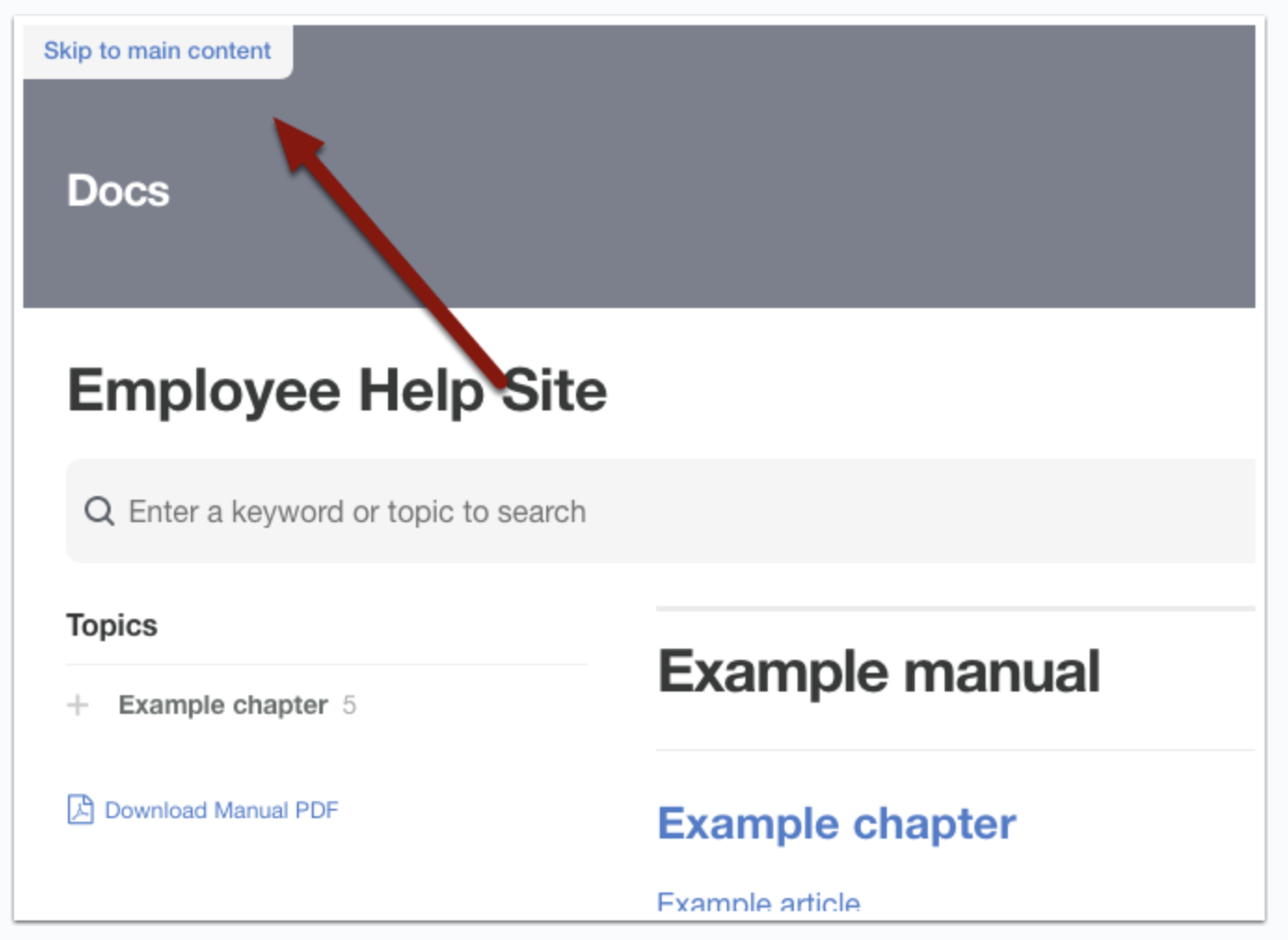
ScreenSteps now includes skip navigation links, allowing keyboard users to bypass repetitive navigation and jump directly to the main content. This feature is especially helpful for users of screen readers and those who navigate without a mouse.
- Skip links reduce the effort required to access core content.
- This feature supports a smoother experience for keyboard and screen reader users.
Why Accessibility Matters
Ensuring accessibility means that all users, regardless of ability, can access and benefit from digital content. These updates help organizations meet legal requirements and provide a more inclusive experience for everyone.
- Accessibility is essential for inclusivity and equal access.
- Compliance reduces legal risk and broadens your audience.