Skip to content
ScreenSteps Help
Search guides and tutorials...
ScreenSteps Help
/
User and Group Permissions
How to add a permission module to a group
Updated on
Jun 10, 2026
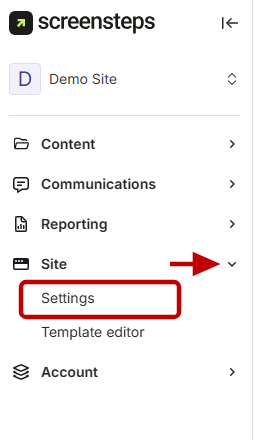
Navigate to Sites settings
Go
to Sites in the side menu.
Click
Settings under Sites.
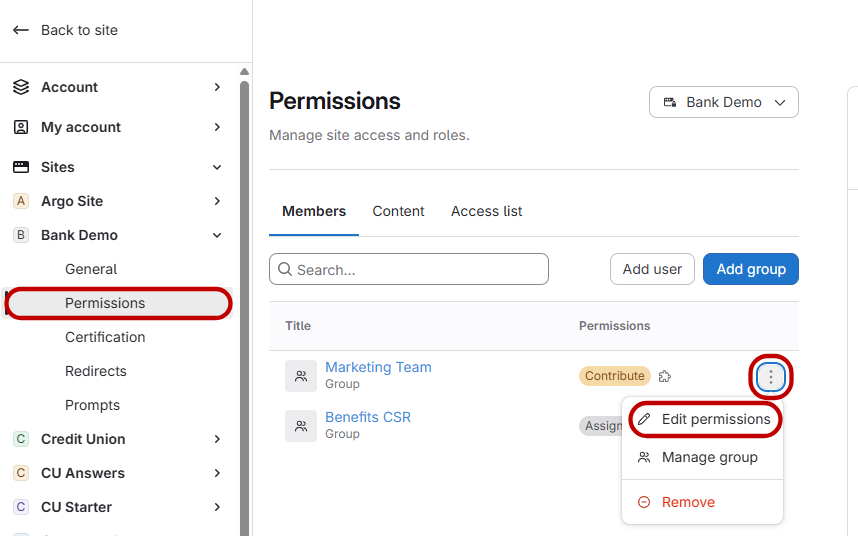
Edit group permissions
Select
Permissions.
Choose
the group or individual you want to change by clicking the three dots.
Click
Edit Permissions.
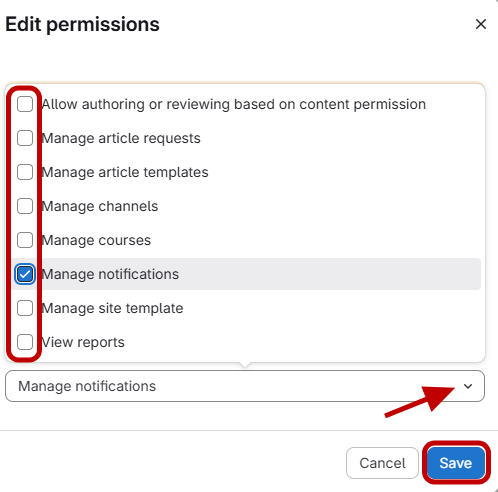
Add a module and save
Click
Select Module.
Add
the desired module (for example, Manage Notifications) to the group.
Click
Save.
Other Resources
Getting Started
Organizing ScreenSteps
Managing Articles
Authoring Content
Working with a Team of Authors
Customize Your Site
PDFs
Admin Tasks
User and Group Permissions
Authentication (SSO, SCIM, SAML, Usernames, Passwords)
Accessibility
Migrating from Legacy to New ScreenSteps
Integrations
Notifications
Browser Extension (Contextual Help)
FAQs
Courses
Print Article